Building a playbook is mostly a matter of writing down decisions your team has already made. You can do that from a blank structure, or let the AI produce a first draft you then correct — which is usually faster, because editing a wrong rule is easier than inventing a right one.
Two ways to start
Open Library → Playbook and select Create playbook. The first choice is how you want to begin:
- Create manually
- An empty playbook with the four default sections, ready for you to add rules yourself. Best when you already have a written policy to transcribe.
- Generate with AI
- A first draft built from your contract type, jurisdiction and negotiation preferences. Best when you are starting from nothing, or want to see what a thorough playbook looks like before writing your own.
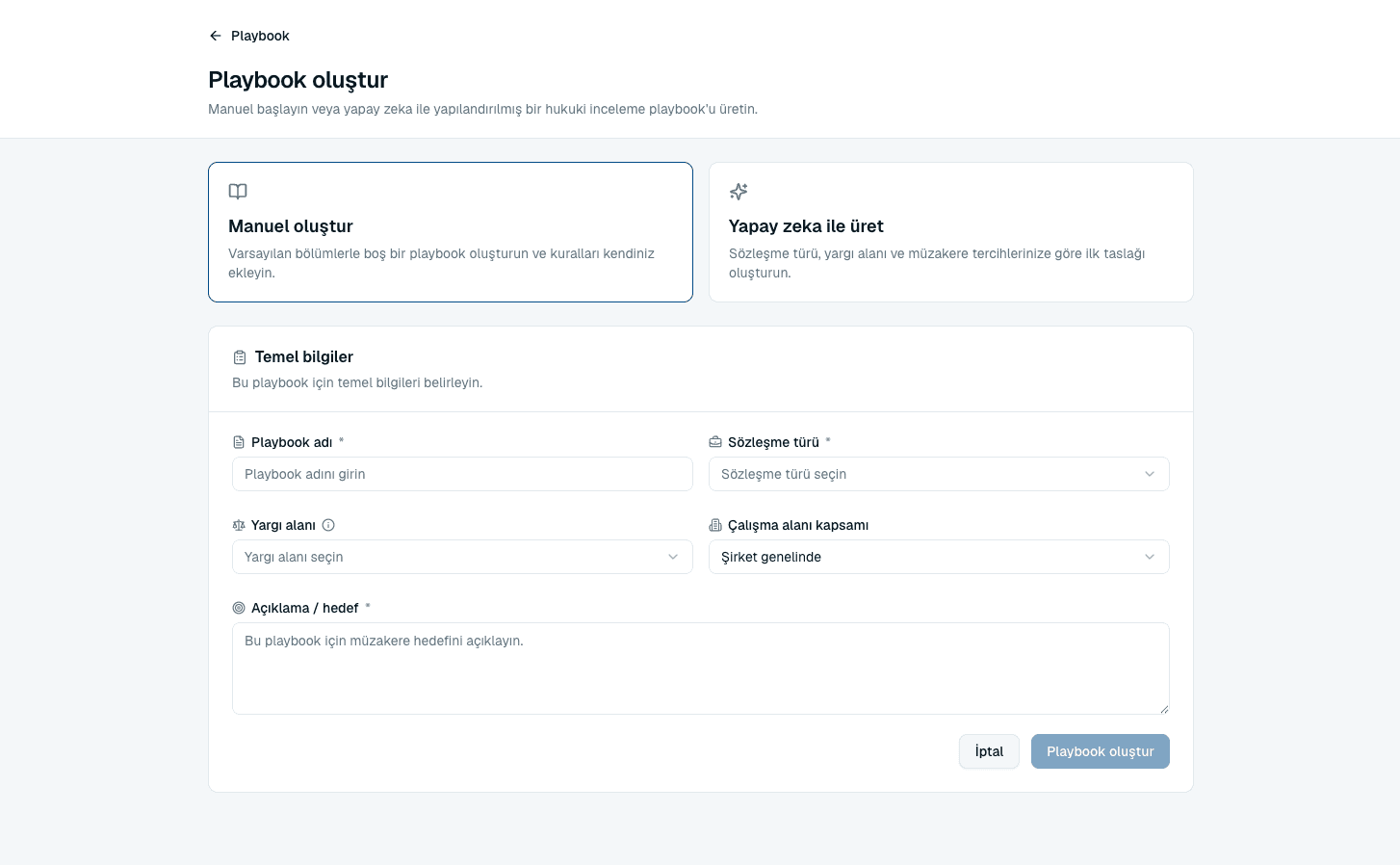
Create manually
- Select Create manually.
- Enter a playbook name and choose the contract type. Name it after the agreement type and the side you are on — “Supplier MSA — we are the customer” beats “MSA v2”.
- Optionally set a jurisdiction, and choose the workspace scope: Company-wide, or a single workspace.
- Create it. The editor opens with your default sections ready to fill.
Generate with AI
AI generation asks for more context than the manual path, because it is writing rules rather than an empty structure. Every field it asks for changes what it produces.
- Select Generate with AI.
- Enter a playbook name and choose the contract type. Leave the name blank and it will be built from the contract type and jurisdiction.
- Fill in the description / goal — describe the negotiation goal for this playbook — and set the jurisdiction, company position and depth. Add optional notes for risk preferences, industry context or deal policy.
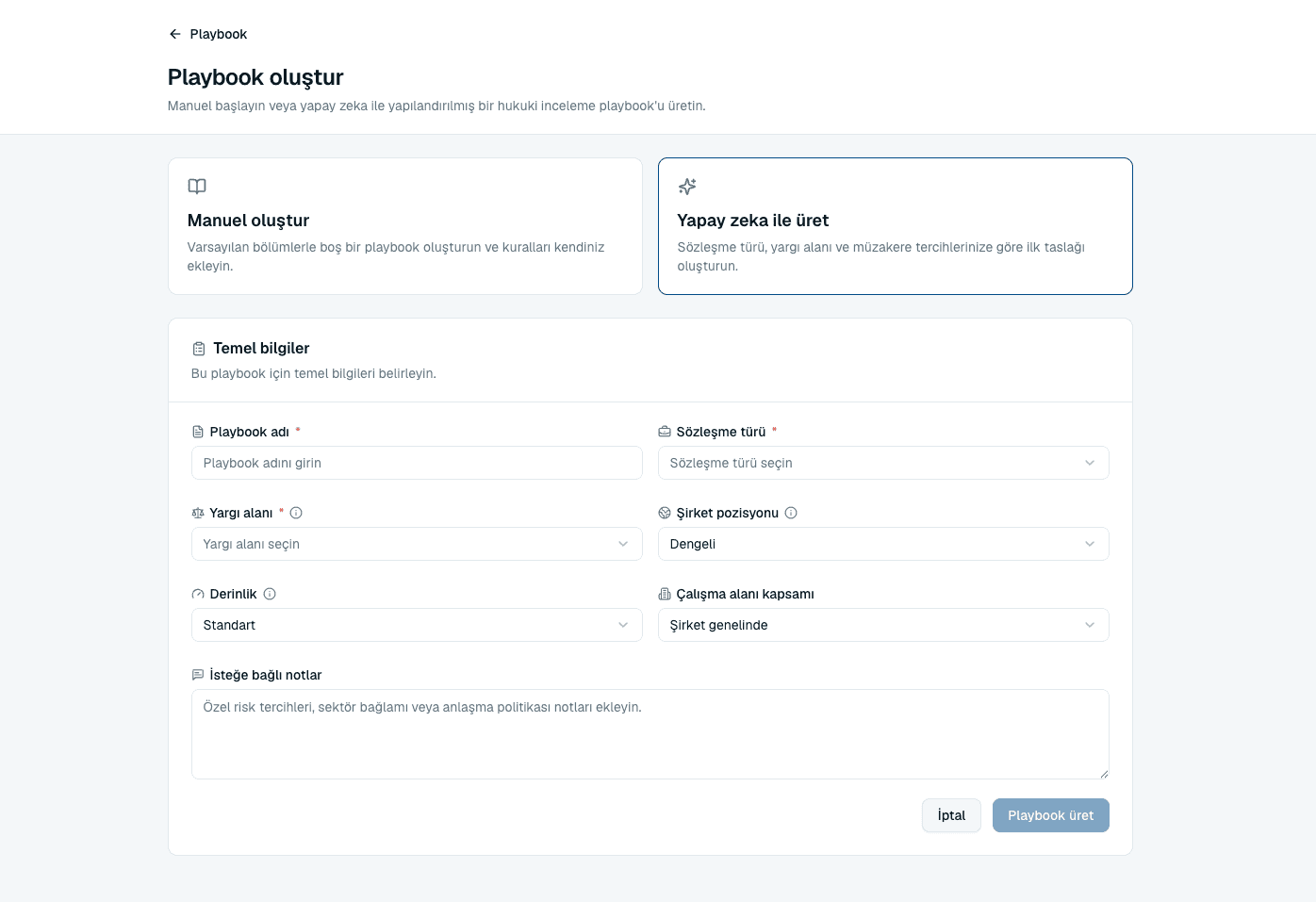 Source screenshots show the Turkish interface.
 - Select Generate playbook and wait. The editor opens with the generated sections and rules in place.
The three options that shape the draft
- Jurisdiction
- Sets the legal system the AI drafts against. United States, Türkiye and Sweden are available here.
- Company position
- The negotiating stance to take: Vendor-friendly, Customer-friendly or Balanced. Choose the side you actually negotiate from — this is what makes the rules yours rather than generic.
- Depth
- How much to write. Focused gives a concise draft of the most important rules, Standard covers common negotiation issues, and Comprehensive produces broader coverage with more depth per rule.
Common questions
The Generate with AI option asks me to upgrade.
AI playbook generation is part of your plan's AI allowance. If your plan does not include it, or the allowance is used up, the manual path is always available.
Why does the jurisdiction list differ from the one in contract review?
They are separate lists for separate jobs. Playbook creation offers the jurisdictions the AI drafts rules for; contract review offers the jurisdictions it judges a contract against.
Can I change the contract type after creating?
The contract type is what a reviewer matches against when choosing a playbook, so if it is wrong it is usually cleaner to create the playbook again with the right type than to work around it.
I got an error saying the name already exists.
Playbook names must be unique within their scope. Either rename this one, or check whether the playbook you are trying to create already exists company-wide.
About this guide
Imported from the application Help Center on 23 September 2026. The original content date is preserved. Product workflows and screenshots have not been revalidated against current account permissions and availability.