One platform for every step of contracting.
From drafting to signature, negotiation to repository and insights — terms, decisions, and changes stay alive at every step. Six modules work on one platform; your team moves with the same knowledge, context is never lost, and processes don’t stall. Not a chatbot — a platform layer built for reliable contract work.
A closer look at the modules
See what each module does, in the product’s own screens.
Drafting
Start from scratch, from a ready-made template, or from the AI generator — and have a signature-ready first version in minutes.
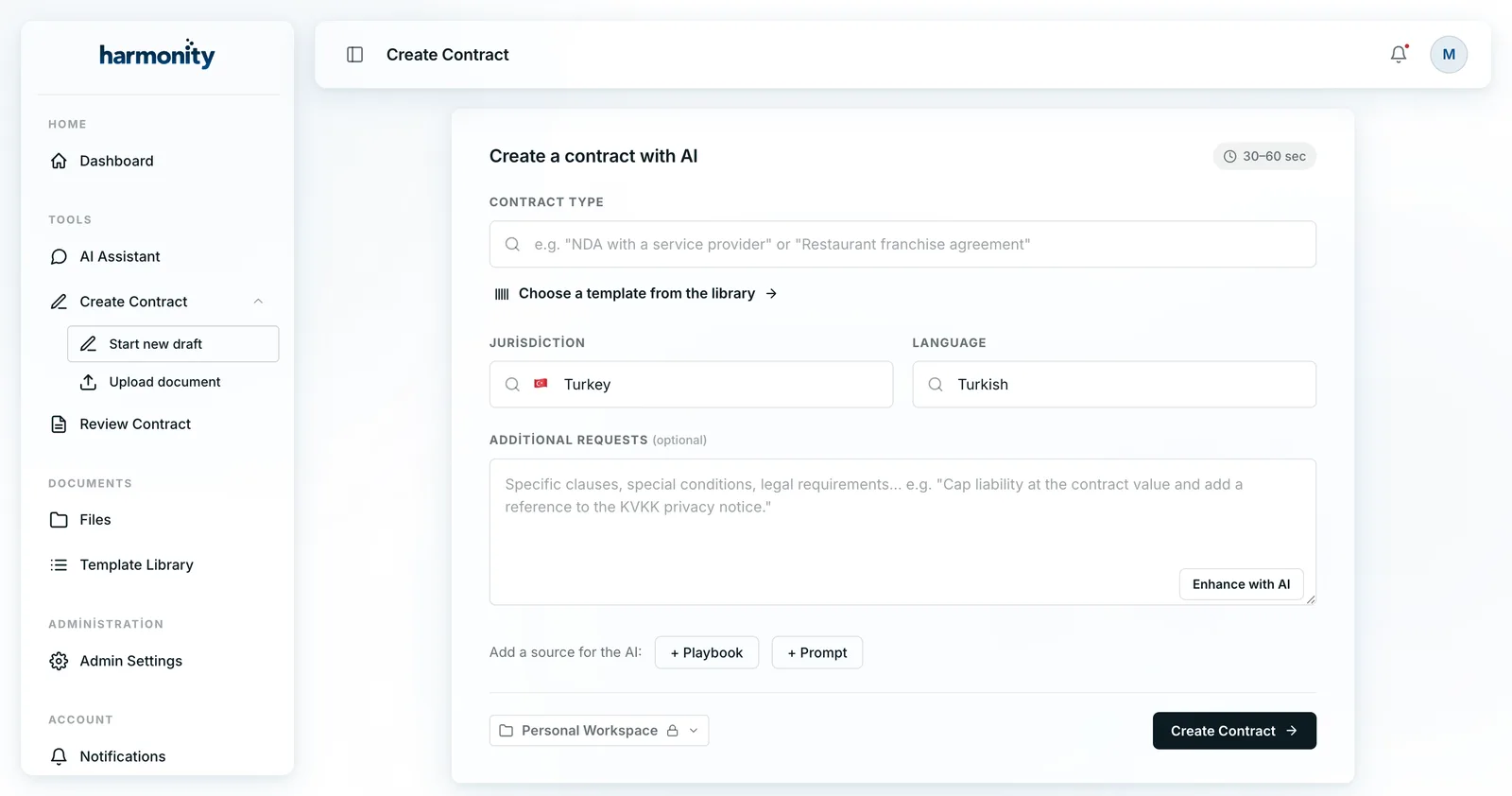
- Create with AIWrite a plain sentence like “an NDA with a service provider” and Harmonity drafts it in 30–60 seconds.
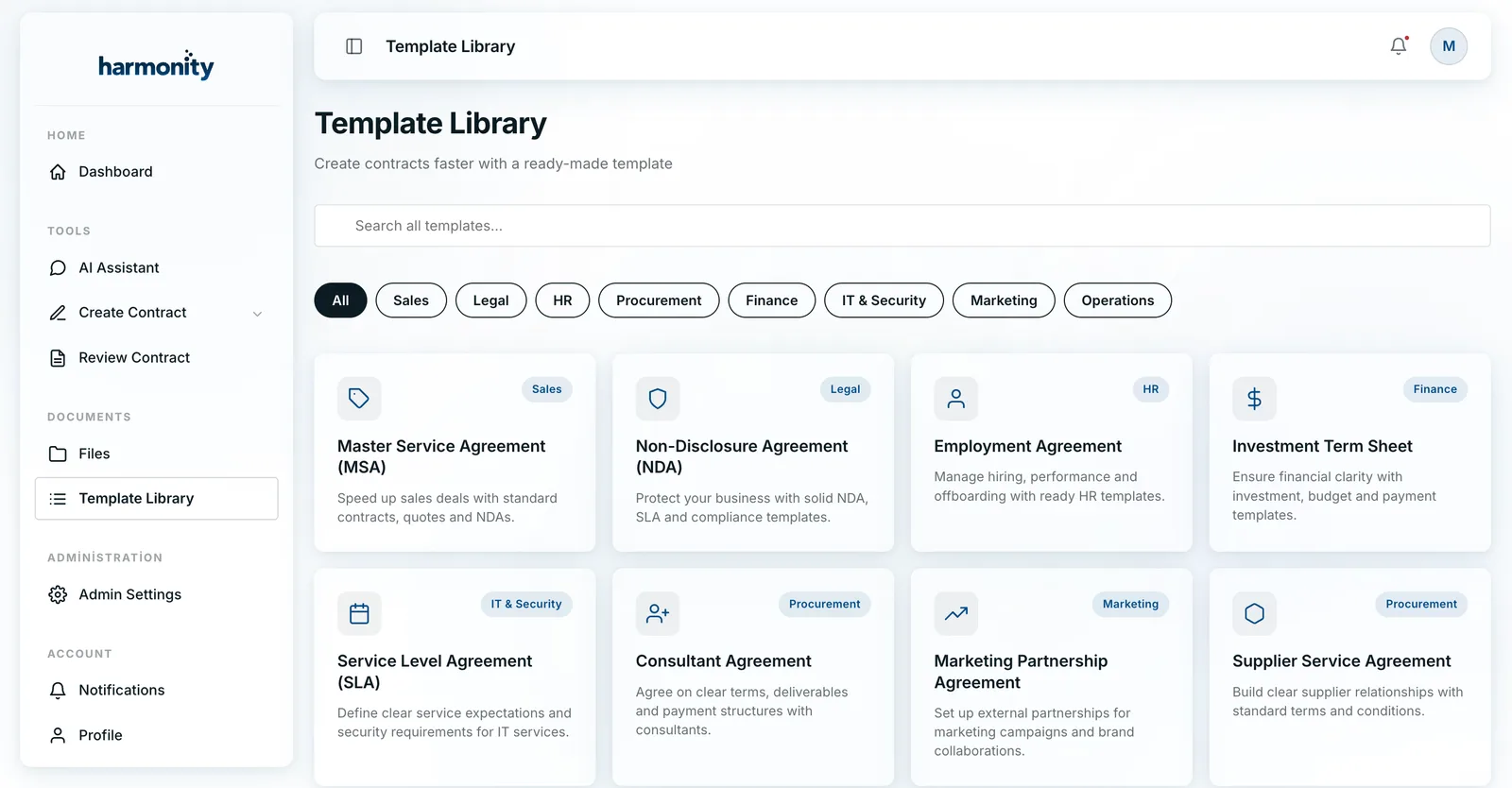
- Template libraryStart from ready-made templates — MSA, NDA, SLA, employment, consultant — and filter them by category.
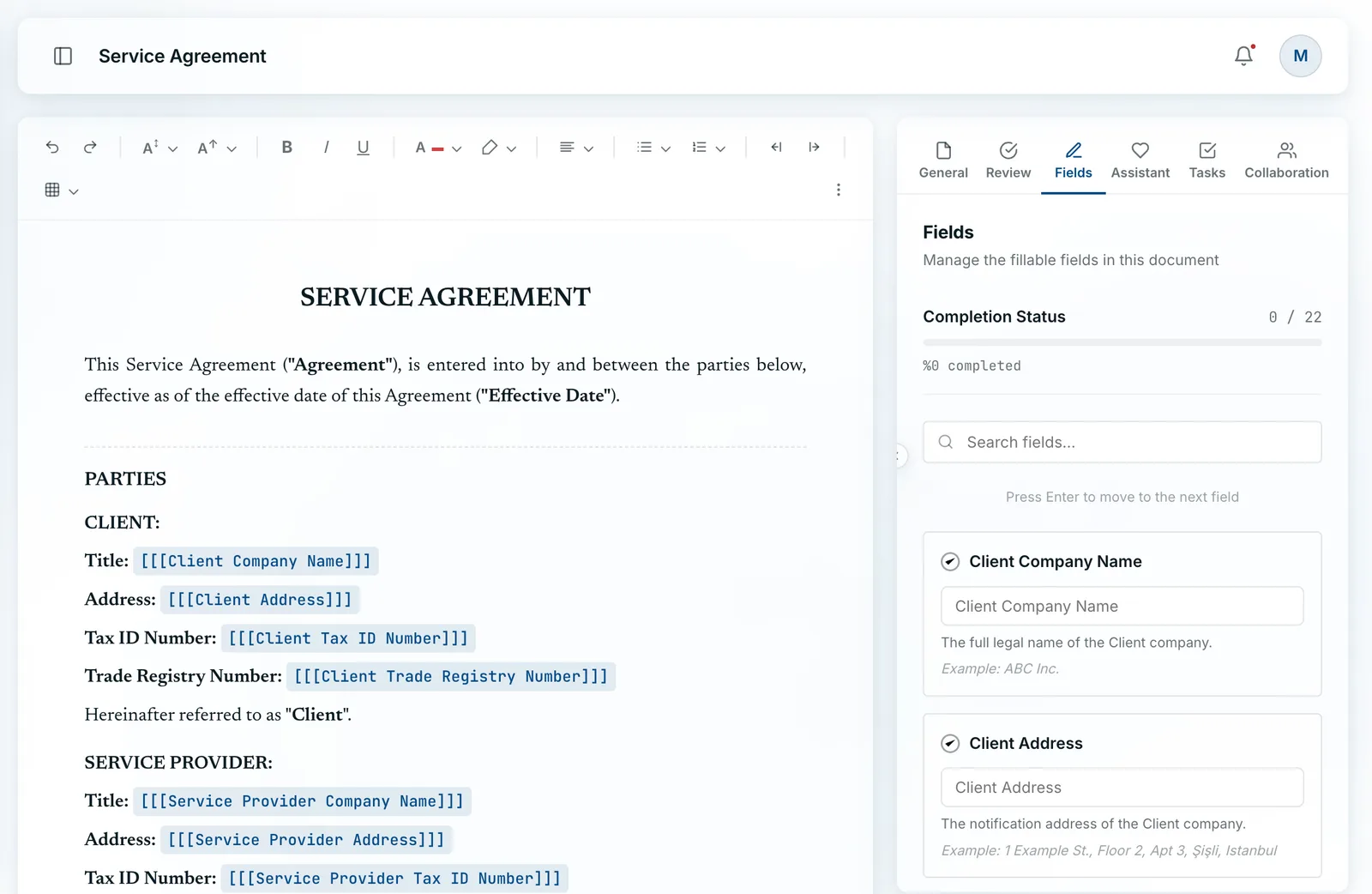
- Smart fieldsParty, address, tax ID, amount, and term are marked in the document and filled in order, with a visible completion status.
- Jurisdiction and languageTailor the contract by jurisdiction (e.g. Turkey), language, deal type, industry, and currency.
- Playbook & Prompt sourcesAdd your company playbook and approved prompts as sources for the generator so the output matches your standards.
- WorkspaceCreate in a personal or shared workspace and set team visibility from the start.
Review
Scan long contracts in minutes and see risks, obligations, and deviations linked to evidence. The final call always stays with you.
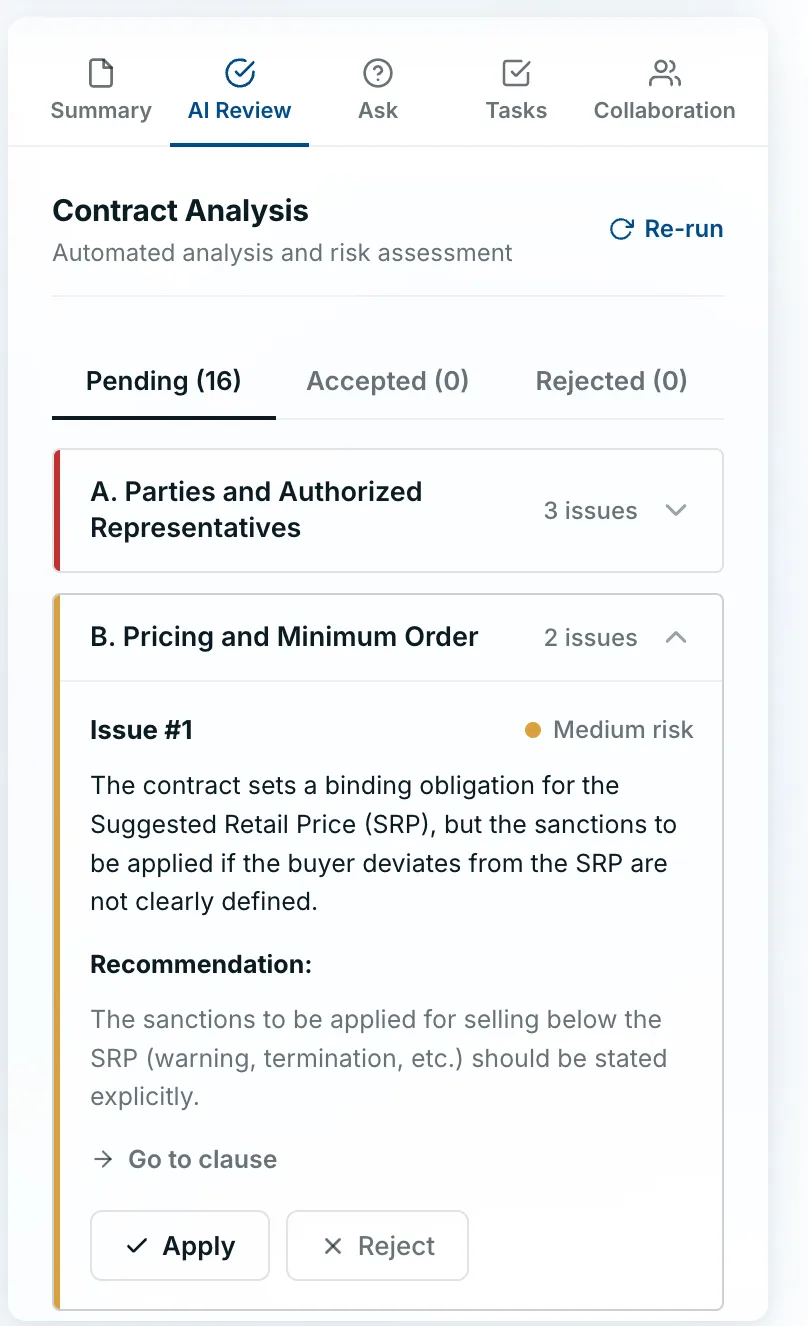
- Automatic risk analysisHarmonity scans the contract, finds risks, obligations, and deviations, and sorts them as pending, accepted, or rejected.
- Risk level and reasonEvery finding comes with a risk level (e.g. medium risk) and its reason, plus a clear suggested fix.
- Evidence-linked findingsEach finding takes you to the relevant clause via “go to clause” — evidence, not a black box.
- Grouped by sectionFindings are grouped by contract section (parties, pricing, termination…) so you see what matters fast.
- Apply or reject in one clickApply the suggested fix or reject it; every decision is kept in version history.
- Playbook checksThe contract is audited against your company policy and playbook; non-standard clauses are flagged.
Collaboration
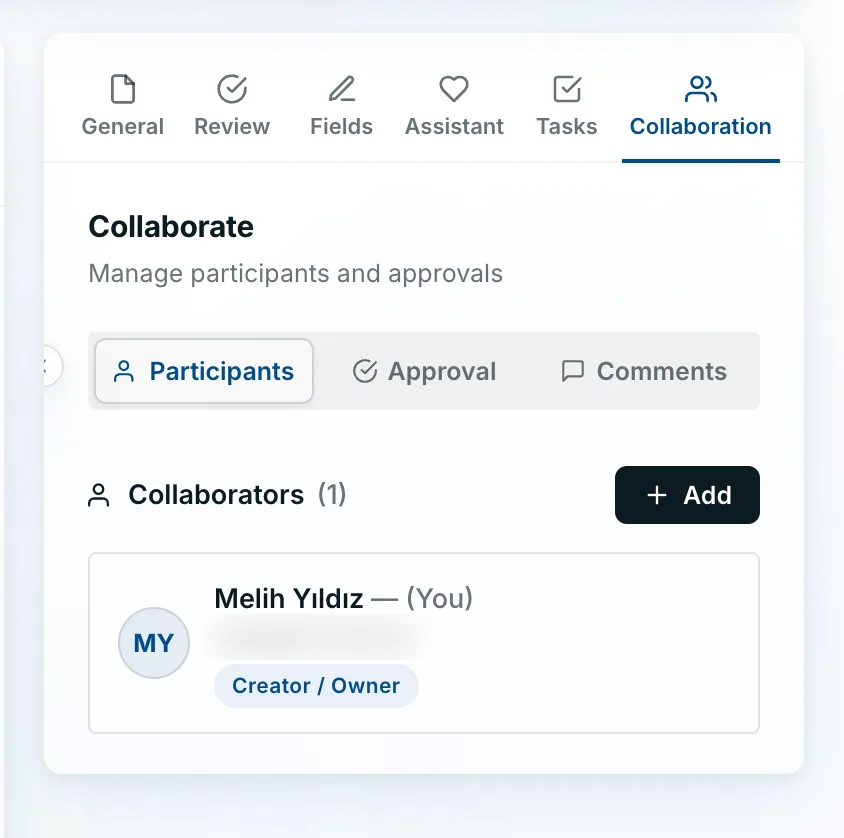
Bring your internal team, external team, and the counterparty into one secure workspace; everything stays attached to the contract itself, and email chains end.
- One workspaceInternal team, external team, and counterparty work on the same contract; scattered files and email chains end.
- Participants and rolesSet who can view, edit, or only approve by role (e.g. Creator/Owner); invite in one click.
- Comments in one placeFeedback stays attached to the relevant clause; the discussion is never lost and everyone shares the same context.
- TasksAssign and track to-dos so the process never stalls on who owes what.
- Participants · Approval · CommentsParticipants, approvals, and comments in a single panel — the whole collaboration at a glance.
- Context is keptEvery comment, task, and decision stays tied to the contract — never reset at any stage.
Approval & Signature
Send the contract for sequential or parallel approval and finish with e-signature; the document stays locked throughout, and every step is on the record.
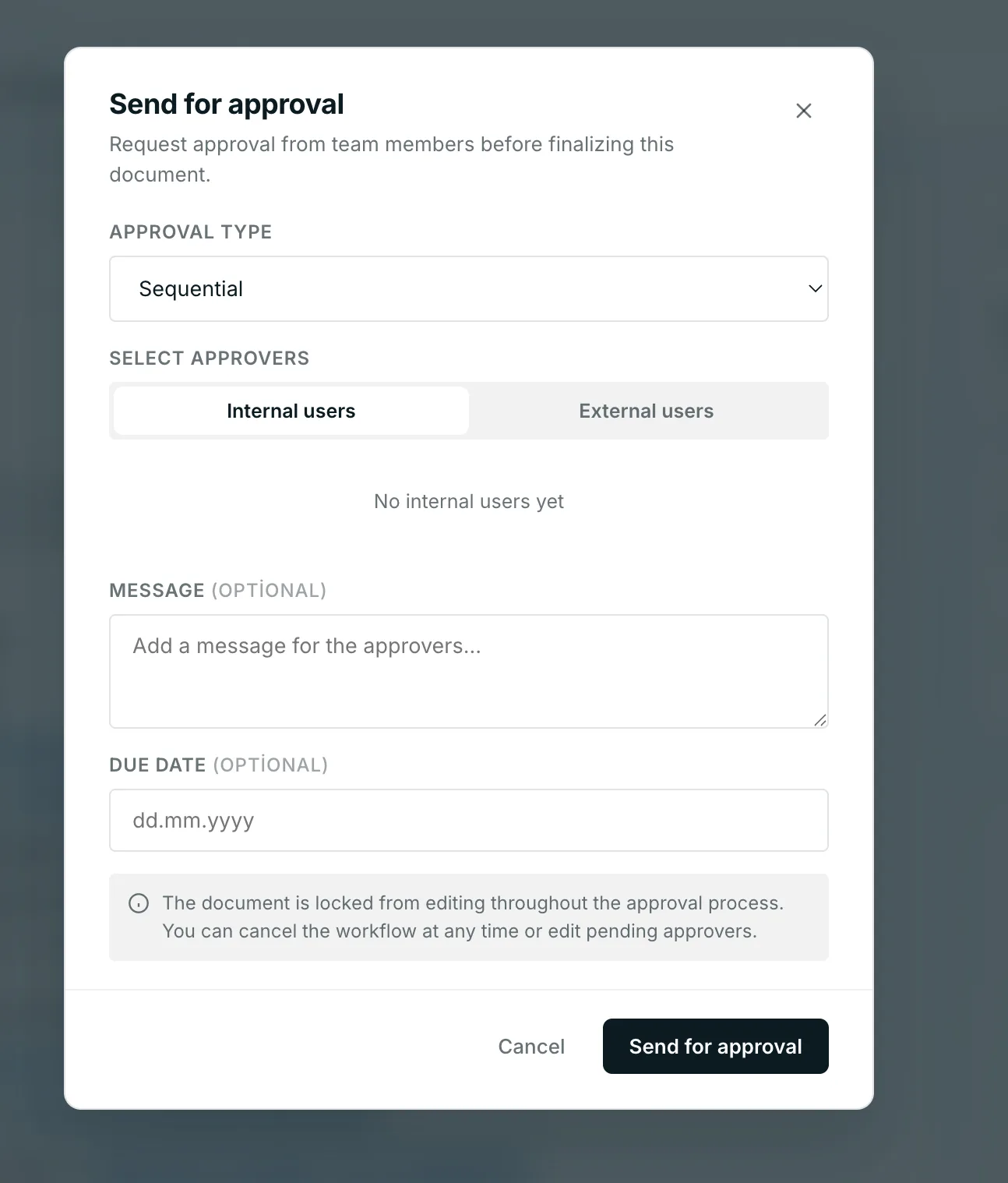
- Send for approvalSend the document to team members for approval before finalizing; it is locked from editing throughout the process.
- Sequential or parallelChoose the approval type (sequential/parallel) and set approvers in the order you want.
- Internal and external approversPick approvers from internal users or external parties; invite in one click.
- Message and due dateAdd an optional message and due date, and edit pending approvers any time.
- E-signatureBETAComplete the approved contract with in-platform e-signature.
- Process controlCancel the workflow whenever you want; every step is captured in the audit trail.
Repository
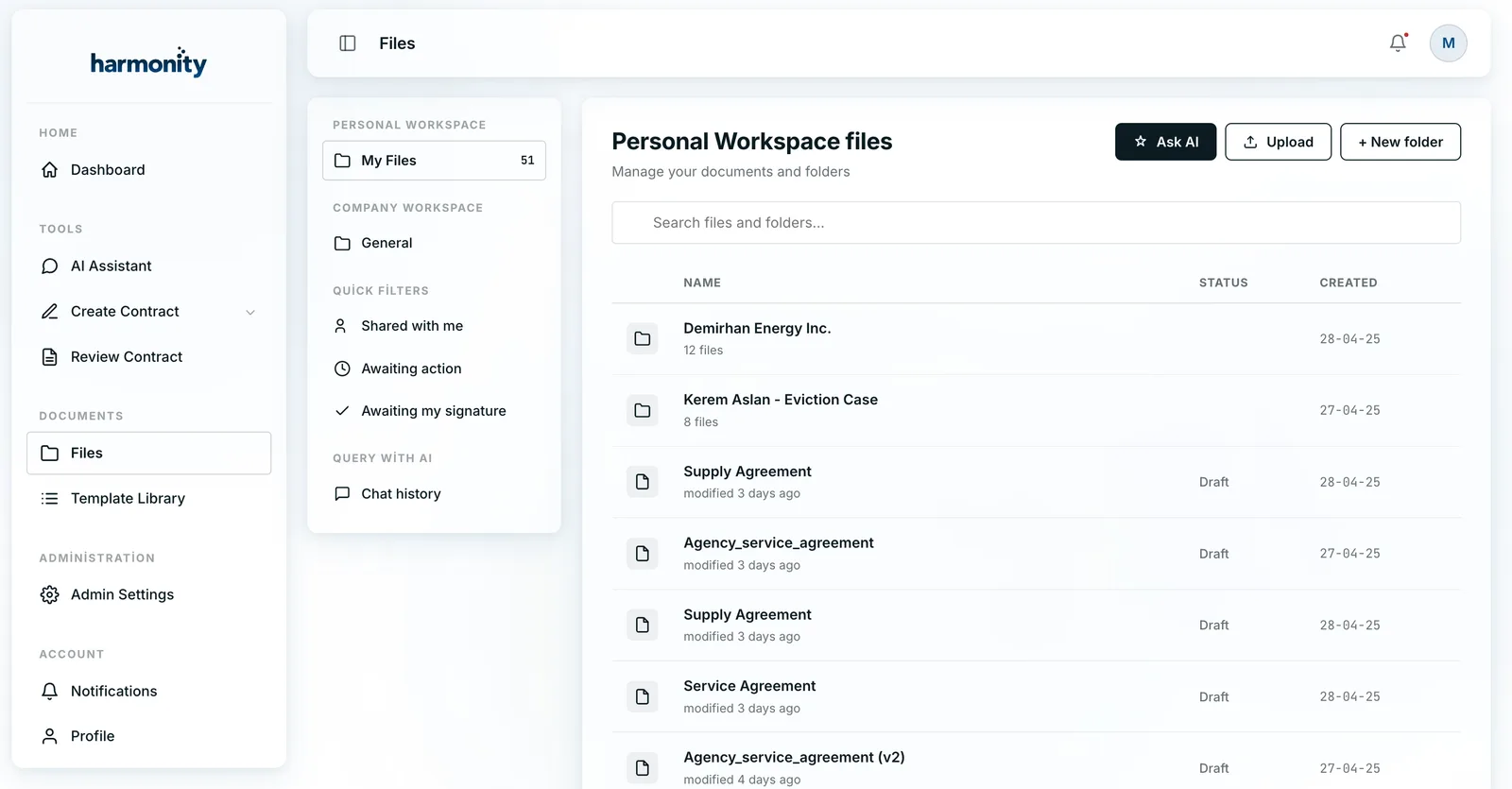
All your contracts in one repository — personal and company workspaces, AI search, and quick filters; reach any document in seconds.
- One repositoryEvery contract, draft, and folder in one place across personal and company workspaces.
- Search with AISearch your files in natural language with “Query with AI”, and return to past queries via chat history.
- Quick filtersJump to what needs you with “Shared with me”, “Awaiting action”, and “Awaiting my signature”.
- Status and dateEvery document is listed with its status (e.g. Draft) and creation date.
- Folders and uploadCreate folders, upload documents, and organize your files in a tidy structure.
- WorkspacesSeparate access with personal and company (shared) workspaces.
Insights
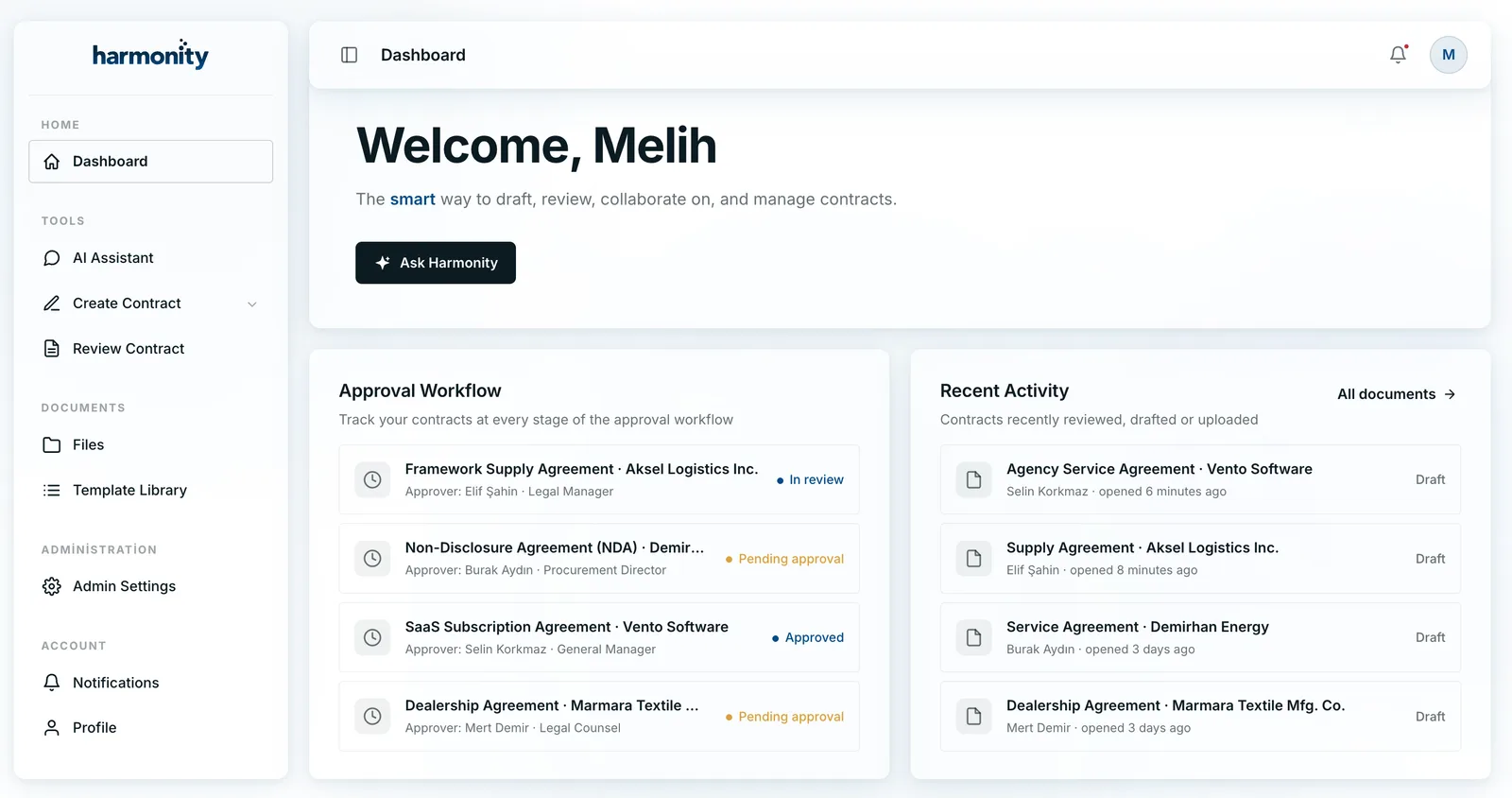
Manage your whole contract portfolio at a glance — approval workflow, recent activity, and status breakdown in real time; always know where each contract stands.
- Contract dashboardSee your whole portfolio on one dashboard — drafting, review, collaboration, and management together.
- Approval workflow trackingTrack contracts at every approval stage: in review, pending approval, approved.
- Recent activitySee recently reviewed, drafted, or uploaded contracts in real time.
- Status breakdownWatch contract status (draft, in review, approved) at a glance.
- Quick accessJump straight from the dashboard into drafting or review with “Ask Harmonity”.
- All documentsReach your full contract archive in one click.
Measurable results, from the first week
Based on early customer measurements — 2026
The intelligence that connects the modules
The modules are strong on their own; the real difference is the AI layer that connects them. Every output is linked to its source, every action is traceable.
Role-specific assistants
Separate assistants for Legal, Sales, HR, and Procurement — each knows its team’s terminology and rules.
Automatic data extraction
Dates, parties, amounts, terms, and obligations extracted automatically — every field linked to its source clause.
Consistency with playbook
Write your review rules once; Harmonity applies the same standard across every contract type.
Semantic search
Answer questions like “show all Net-45 payment terms” across the whole archive, linked to the source.
No silent edits
Explainable AI: every suggestion shows the clause it’s based on and never reflects in the document until you approve.
Security and audit
SOC 2 Type II, KVKK and GDPR compliance, role-based access, EU data region, and an immutable audit trail.
Her ay onlarca sözleşme inceliyorum. Harmonity'nin inceleme modülü, riskli maddeleri dakikalar içinde işaretliyor. İlk tur inceleme sürem neredeyse yarıya indi; üstelik son karar yine bende kalıyor.
Risky clauses flagged in minutes — first-pass review time nearly halved.
Fikri mülkiyet maddeleri işimin merkezinde. Harmonity; lisans, devir ve gizlilik hükümlerini saniyeler içinde buluyor. Doğrudan değerlendirmeye geçiyorum.
License, assignment, and confidentiality clauses found in seconds.
Sözleşme versiyonları eskiden e-posta zincirlerinde kayboluyordu. Artık yorumlar, versiyonlar ve onaylar tek yerde ilerliyor; gelen yorumları bile yapay zekâ analiz ediyor.
Comments, versions, and approvals now move in one place.
İnceleme süreçlerimi artık büyük ölçüde Harmonity ile yürütüyorum. Riskleri gerekçeleriyle gösteriyor; Word yorumlarını da analiz ediyor. Müvekkillerime aynı gün dönüyorum.
Risks shown with reasoning, Word comments analyzed — same-day client turnaround.
Şirketimizde ayrı bir hukuk ekibi yok. Harmonity ile sözleşmelerimizi dakikalar içinde hazırlıyor, taslakları güvenle paylaşıyoruz. Enerjimizi işimizi büyütmeye ayırıyoruz.
Contracts drafted in minutes and shared safely — without an in-house legal team.
Questions you might have
Does the AI change the contract on its own?
No. There are no silent edits: every suggestion shows the clause it’s based on and nothing reflects in the document until your team approves.
The AI suggests; a human always decides.
Where is our data stored, and how safe is it?
Harmonity is SOC 2 Type II certified, compliant with KVKK and GDPR, and offers an EU data region option.
With role-based access, document-level permissions, and an immutable audit trail, who sees and does what is always on record.
Which contract types does it support?
A wide range, including common types such as NDAs, service, sales, employment, and SOWs. Contracts are tailored to deal type, industry, jurisdiction, and currency.
It works in both Turkish and English.
Can we upload our existing contracts?
Yes. Upload your existing contracts and Harmonity automatically extracts dates, parties, amounts, and obligations, making them all searchable and traceable.
How do we manage access — who can see what?
You define separate permissions for each workspace and document: who can view, who can edit, who can only approve. The AI also operates only within a user’s permissions, so sensitive data stays invisible to unauthorized users.
Do we need a credit card to try it?
No. You can try every feature free for 7 days — no credit card required, with setup support included.