A finished review is a list of findings, each tied to the clause that produced it. Working top-down through severity is the quickest way to make a contract safe to sign.
The Contract Analysis panel
Findings live in the Contract Analysis panel, which you reach from the AI Review tab of the document side panel. Its header shows how many issues were found, and the findings beneath are grouped by contract section, with the section's highest severity shown alongside it. Findings that came from one of your playbook rules are grouped under Playbook findings.
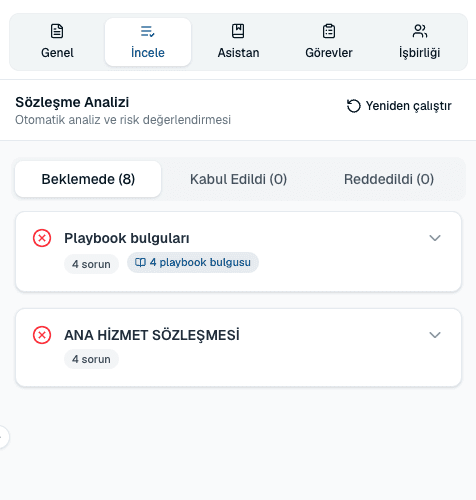
What a finding contains
- Issue number
- Findings are numbered in order — Issue #1, Issue #2 — so you can refer to one in a comment or an email.
- Risk indicator
- A colour and label showing whether the finding is high, medium or low severity.
- Playbook rule
- Present only when the finding came from one of your rules. It names the matched rule, so you can see which position was triggered.
- Recommendation
- What to do about it, usually including replacement wording you can use as-is.
- Status
- Whether you have already accepted or rejected the suggestion.
Risk severities
- High
- A term that exposes you to material risk, conflicts with an unacceptable position in your playbook, or is missing where it should be present. Deal with these before signing.
- Medium
- A term that is worse than your standard position but negotiable. Worth pushing back on when you have leverage.
- Low
- Wording that is acceptable but could be tightened. Useful cleanup; rarely a reason to hold up a deal.
Act on a finding
- Select Jump to clause to move the document to the exact wording the finding refers to.
- Read the Recommendation alongside the original text.
- Select Apply to write the suggested wording into the contract, or Reject to keep your text.
- Use the Pending, Accepted and Rejected tabs to track what you have worked through. Each tab shows a count.
The bigger picture: Document Overview
Clause-by-clause findings answer what to change. The Document Overview panel answers whether to sign at all, across four tabs:
- Summary
- An executive summary of the agreement in plain language.
- Risk
- The overall risk assessment, including an overall score out of 100.
- Negotiation
- The negotiating points, marked as a Strength, a Weakness or Neutral for your side.
- Actions
- The recommended actions to take before signing.
Common questions
I applied a suggestion by mistake. Can I undo it?
Yes. Applying a suggestion is an ordinary edit, so Undo in the editor reverses it like any other change.
Why did a clause I care about get no finding?
Either it matched your playbook's standard position, or no rule covers it and the general review found nothing unusual. If it matters to your organization, add a rule for it — that is exactly what playbooks are for.
What is the difference between a playbook finding and a normal one?
A playbook finding was triggered by one of your own rules and names that rule. A normal finding comes from the general legal analysis. Playbook findings are grouped together so you can see policy breaches separately from general observations.
Can I trust the findings without reading the contract?
No. Treat findings as a well-informed first pass by a fast reviewer, not as legal advice. A qualified person should still read anything you are about to sign.
About this guide
Imported from the application Help Center on 23 September 2026. The original content date is preserved. Product workflows and screenshots have not been revalidated against current account permissions and availability.