Inside a document, the Ask tab is a chat that already knows which contract you are looking at. It is the fastest way to find an obligation, a date, or the answer to “does this actually say what I think it says?”
Open the Ask tab
- Open the document and select Ask in the side panel.
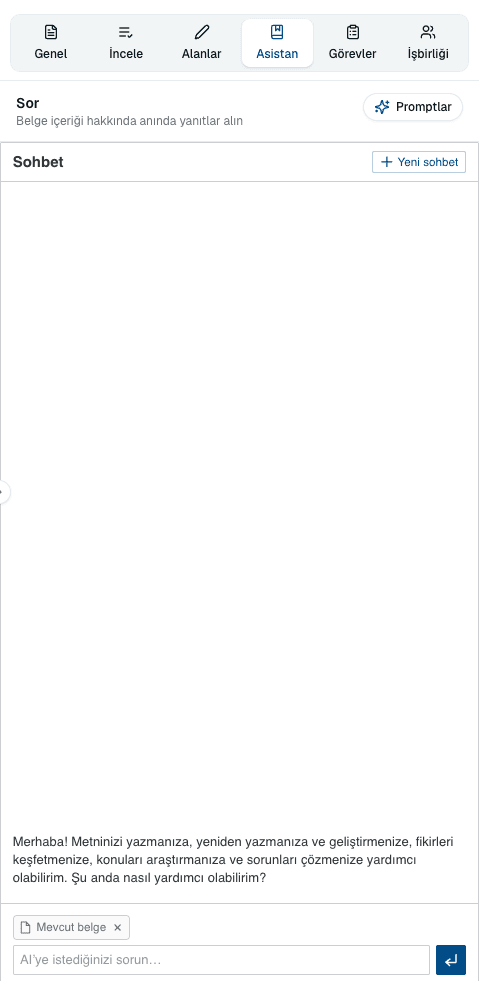 Source screenshots show the Turkish interface.
 - Type your question in the box at the bottom. The document you have open is already attached to the conversation, shown as a chip above the input.
- Read the answer. It is drawn from this document, so it can quote the wording it came from.
The controls in the panel
- Prompts
- Opens the Prompt Library so you can drop a saved instruction into the box instead of typing it out.
- New chat
- Starts a fresh conversation about the same document. Worth doing when you change subject, so earlier questions stop colouring the answers.
- Current document
- The chip above the input showing which document the chat is working from. Remove it and you are asking a general question instead.
Getting better answers
- Ask one thing at a time
- “What is the notice period for termination for convenience?” beats “tell me about termination”.
- Say what form you want
- “List every date and what it triggers, as bullet points.” The shape of the question decides the shape of the answer.
- Name the party
- “What are the supplier's obligations on data breach?” — contracts are asymmetric, and the answer depends on whose side you are asking about.
- Ask it to quote
- “Quote the exact wording that limits liability.” An answer with the clause attached is one you can verify in seconds.
Common questions
Does Ask see the whole document?
Yes, it works from the document you have open — which is why its answers are specific in a way a general chat cannot be.
Can it change the document?
No. Ask answers questions. To change wording, use the AI quick actions in the editor or apply a suggestion from the AI Review tab.
The tab is empty and tells me to save first.
Ask works on a saved document. Save the draft and the chat becomes available. It is also unavailable if you only have read-only access.
About this guide
Imported from the application Help Center on 23 September 2026. The original content date is preserved. Product workflows and screenshots have not been revalidated against current account permissions and availability.