The AI Assistant is a legal-specialist chat that sits alongside your work. Use it for the questions you would otherwise take to a colleague — what a clause means, how a term is usually handled, what to watch for in a kind of agreement. It can read your workspace documents, search the web when you allow it, and show you exactly where each answer came from.
Start a conversation
- Open Tools → AI Assistant in the sidebar.
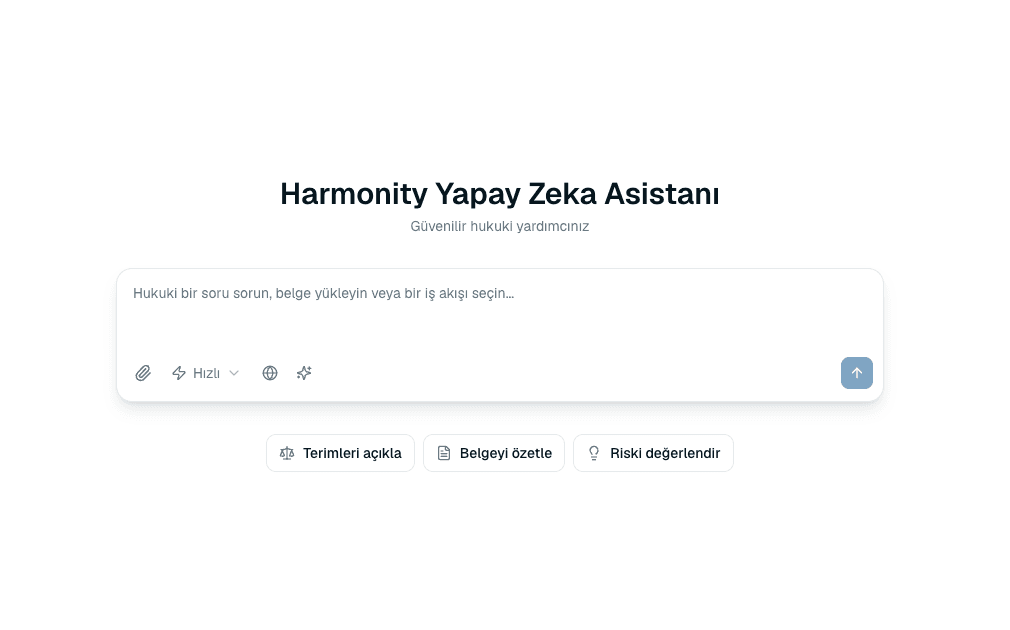 Source screenshots show the Turkish interface.
 - Type your question, or use one of the suggested starters — Summarize document, Explain terms or Assess risk.
- Press Send. The answer streams in as it is produced, so you can start reading before it finishes.
The controls around the message box
Most of the assistant's power is in the row of controls beside where you type. They change what it can reach:
- Attach a file
- Bring in a
.docxor.udffrom your computer for this conversation. - Reference
- Point at a document already in a workspace. You can browse workspaces, search by name, and see whether each document is Ready — a document still Processing cannot be referenced yet.
- Use web sources
- Lets the assistant search the web as well as your documents. Off by default, so an answer is grounded in your own material unless you ask otherwise.
- Prompts
- Opens the Prompt Library so you can drop a saved instruction straight into the message box.

Quick or Deep Review
You choose how much work the assistant does before answering. The setting sits with the other composer controls and applies to the message you are about to send.
- Quick
- A short, practical answer. Right for “what does this term mean?” and anything you would expect a colleague to answer in a sentence.
- Deep Review
- A structured analysis with risks, reasoning and recommendations. Slower, and worth it when the answer will inform a decision rather than satisfy curiosity.
Coming back to a conversation
Chat history lists your previous conversations, so you can reopen one and carry on with all its context intact. New Chat starts a clean one — worth doing when you change subject, because a long conversation about one contract is not useful context for a question about another.
Common questions
Does the assistant know about my contracts?
Only what you give it. Attach a file, use Reference to point at a workspace document, or use the Ask tab inside a document. Without one of those it answers from general legal knowledge.
Why can't I reference a document I can see in Files?
Its text is probably still being extracted. The picker marks documents Ready, Processing or Failed, and only a ready document can be referenced.
What does the number next to the input mean?
It is how much of your plan's AI allowance remains. When it runs out, the assistant stops until the allowance resets or your plan is upgraded.
Are my chats saved?
Yes, in your chat history, so you can return to a conversation later.
About this guide
Imported from the application Help Center on 23 September 2026. The original content date is preserved. Product workflows and screenshots have not been revalidated against current account permissions and availability.